---
title: "Text Processing &
Regular Expressions"
subtitle: "Lecture 11"
author: "Dr. Colin Rundel"
footer: "Sta 323 - Spring 2025"
format:
revealjs:
theme: slides.scss
slide-number: true
self-contained: true
execute:
echo: true
warning: true
engine: knitr
---
```{r setup}
#| message: false
#| warning: false
#| include: false
options(
width=80
)
knitr::opts_chunk$set(
fig.align = "center", fig.retina = 2, dpi = 150,
out.width = "100%"
)
library(stringr)
library(tidyverse)
```
## Base R string functions
As you have likely noticed, the individual characters in a string (element of a character vector) cannot be directly accessed. Base R provides a number helpful functions for pattern matching and manipulation of these strings:
- `paste()`, `paste0()` - concatenate strings
- `substr()`, `substring()` - extract or replace substrings
- `sprintf()`, `formatC()` - C-like string formatting
- `nchar()` - counts characters
- `strsplit()` - split a string into substrings
- `grep()`, `grepl()` - regular expression pattern matching
- `sub()`, `gsub()` - regular expression pattern replacement
- `+` many more - the *See Also* section of the the above functions' documentation to find additional functions.
##
:::: {.columns}
::: {.column width='60%'}
{width=90% fig-align="center" }
:::
::: {.column width='40%' .small}
> Strings are not glamorous, high-profile components of R, but they do play a big role in many data cleaning and preparation tasks. The `stringr` package provides a cohesive set of functions designed to make working with strings as easy as possible. ...
>
> `stringr` is built on top of `stringi`, which uses the ICU C library to provide fast, correct implementations of common string manipulations. `stringr` focusses on the most important and commonly used string manipulation functions whereas stringi provides a comprehensive set covering almost anything you can imagine.
:::
::::
## Fixed width strings - `str_pad()`
:::: {.small}
```{r}
str_pad(10^(0:5), width = 8, side = "left") |>
cat(sep="\n")
```
```{r}
str_pad(10^(0:5), width = 8, side = "right") |>
cat(sep="\n")
```
::::
## `formatC()` (base)
:::: {.columns .xsmall}
::: {.column width='50%'}
```{r}
cat(10^(0:5), sep="\n")
formatC(
10^(0:5), digits = 6, width = 6
) |>
cat(sep="\n")
```
:::
::: {.column width='50%'}
```{r}
cat(1/10^(0:5), sep="\n")
formatC(
1/10^(0:5), digits = 6, width = 6,
format = "fg"
) |>
cat(sep="\n")
```
:::
::::
## Whitespace trimming - `str_trim()`, `str_squish()`
```{r}
(x = c(" abc" , "ABC " , " Hello. World "))
```
. . .
```{r}
str_trim(x)
```
. . .
```{r}
str_trim(x, side="left")
```
. . .
```{r}
str_trim(x, side="right")
```
. . .
```{r}
str_squish(x)
```
## String shortening - `str_trunc()`
::: {.small}
```{r}
x = "Lorem ipsum dolor sit amet, consectetur adipiscing elit, sed do eiusmod tempor incididunt ut labore et dolore magna aliqua. Ut enim ad minim veniam, quis nostrud exercitation ullamco laboris nisi ut aliquip ex ea commodo consequat. Duis aute irure dolor in reprehenderit in voluptate velit esse cillum dolore eu fugiat nulla pariatur. Excepteur sint occaecat cupidatat non proident, sunt in culpa qui officia deserunt mollit anim id est laborum."
```
:::
. . .
::: {.small}
```{r}
str_trunc(x, width=60)
```
:::
. . .
::: {.small}
```{r}
str_trunc(x, width=60, side = "left")
```
:::
. . .
::: {.small}
```{r}
str_trunc(x, width=60, side = "center")
```
:::
## String wrapping - `str_wrap()`
::: {.small}
```{r}
cat(x)
```
:::
. . .
::: {.small}
```{r}
str_wrap(x)
```
:::
##
::: {.small}
```{r}
str_wrap(x) |> cat()
```
:::
. . .
::: {.small}
```{r}
str_wrap(x, width=60) |> cat()
```
:::
## Strings templates - `str_glue()`
This is a simplified wrapper around `glue::glue()` (use the original for additional control).
:::: {.columns .small}
::: {.column width='50%'}
```{r}
paste("The value of pi is" , pi)
str_glue("The value of pi is {pi}")
```
:::
::: {.column width='50%'}
```{r}
paste("The value of tau is" , 2*pi)
str_glue("The value of tau is {2*pi}")
```
:::
::::
. . .
::: {.small}
```{r}
str_glue_data(
iris |> count(Species),
"{Species} has {n} observations"
)
```
:::
## String capitalization
::: {.small}
```{r}
x = "Lorem ipsum dolor sit amet, consectetur adipiscing elit, sed do eiusmod tempor incididunt ut labore et dolore magna aliqua."
```
:::
. . .
::: {.small}
```{r}
str_to_lower(x)
```
:::
. . .
::: {.small}
```{r}
str_to_upper(x)
```
:::
. . .
::: {.small}
```{r}
str_to_title(x)
```
:::
. . .
::: {.small}
```{r}
str_to_sentence(x)
```
:::
# Regular Expressions
## Regular expressions
> A regular expression (shortened as regex or regexp), sometimes referred to as rational expression, is a sequence of characters that specifies a match pattern in text. Usually such patterns are used by string-searching algorithms for "find" or "find and replace" operations on strings, or for input validation. Regular expression techniques are developed in theoretical computer science and formal language theory.
>
> The concept of regular expressions began in the 1950s, when the American mathematician Stephen Cole Kleene formalized the concept of a regular language. They came into common use with Unix text-processing utilities. Different syntaxes for writing regular expressions have existed since the 1980s, one being the POSIX standard and another, widely used, being the Perl syntax.
>
> *Source:* [Wikipedia](https://en.wikipedia.org/wiki/Regular_expression)
## stringr regular expression functions
::: {.medium}
| Function | Description |
|:-------------|:------------------------------------|
|`str_detect` | Detect the presence or absence of a pattern in a string. |
|`str_subset` | Subset a vector of strings based on the presence of a pattern. |
|`str_locate` | Locate the first position of a pattern and return a matrix with start and end. |
|`str_extract` | Extracts text corresponding to the first match. |
|`str_match` | Extracts capture groups formed by `()` from the first match. |
|`str_split` | Splits string into pieces and returns a list of character vectors. |
|`str_replace` | Replaces the first matched pattern and returns a character vector. |
|`str_remove` | Removes the first matched pattern and returns a character vector. |
|`str_view` | Show the matches made by a pattern. |
:::
Many of these functions have variants with an `_all` suffix (e.g. `str_replace_all`) which will match more than one occurrence of the pattern in a string.
## Simple Pattern Detection
::: {.small}
```{r}
text = c("The quick brown" , "fox jumps over" , "the lazy dog")
```
:::
. . .
:::: {.columns .small}
::: {.column width='50%'}
```{r}
str_detect(text, "quick")
```
:::
::: {.column width='50%'}
```{r}
str_subset(text, "quick")
```
:::
::::
. . .
:::: {.columns .small}
::: {.column width='50%'}
```{r}
str_detect(text, "o")
```
:::
::: {.column width='50%'}
```{r}
str_subset(text, "o")
```
:::
::::
. . .
:::: {.columns .small}
::: {.column width='50%'}
```{r}
str_detect(text, "row")
```
:::
::: {.column width='50%'}
```{r}
str_subset(text, "row")
```
:::
::::
. . .
:::: {.columns .small}
::: {.column width='50%'}
```{r}
str_detect(text, "the")
```
:::
::: {.column width='50%'}
```{r}
str_subset(text, "the")
```
:::
::::
. . .
:::: {.columns .small}
::: {.column width='50%'}
```{r}
str_detect(
text, regex("the", ignore_case=TRUE)
)
```
:::
::: {.column width='50%'}
```{r}
str_subset(
text, regex("the", ignore_case=TRUE)
)
```
:::
::::
## Aside - Escape Characters
An escape character is a character which results in an alternative interpretation of the subsequent character(s).
These vary from language to language but for most string implementations `\` is the escape character which is modified by a single following character.
Some common examples:
::: {.medium}
| Literal | Character |
|:--------|:-----------------|
|`\'` | single quote |
|`\"` | double quote |
|`\\` | backslash |
|`\n` | new line |
|`\r` | carriage return |
|`\t` | tab |
|`\b` | backspace |
|`\f` | form feed |
:::
## Examples
:::: {.columns}
::: {.column width='50%'}
```{r}
#| error: True
print("a\"b")
```
:::
::: {.column width='50%'}
```{r}
#| error: True
cat("a\"b")
```
:::
::::
. . .
:::: {.columns}
::: {.column width='50%'}
```{r}
#| error: True
print("a\tb")
```
:::
::: {.column width='50%'}
```{r}
#| error: True
cat("a\tb")
```
:::
::::
. . .
:::: {.columns}
::: {.column width='50%'}
```{r}
#| error: True
print("a\nb")
```
:::
::: {.column width='50%'}
```{r}
#| error: True
cat("a\nb")
```
:::
::::
. . .
:::: {.columns}
::: {.column width='50%'}
```{r}
#| error: True
print("a\\b")
```
:::
::: {.column width='50%'}
```{r}
#| error: True
cat("a\\b")
```
:::
::::
## Raw character constants
As of v4.0, R has the ability to define raw character sequences which avoids the need for most escape characters, they can be constructed using the `r"(...)"` syntax, where `...` is the raw string.
. . .
:::: {.columns}
::: {.column width='50%'}
```{r}
print(
"\\int_0^\\infty 1/e^x"
)
print(
r"(\int_0^\infty 1/e^x)"
)
```
:::
::: {.column width='50%'}
```{r}
cat(
"\\int_0^\\infty 1/e^x"
)
cat(
r"(\int_0^\infty 1/e^x)"
)
```
:::
::::
::: {.aside}
`[]` and `{}` can be used instead of `()` - see `?Quotes` for details
:::
## RegEx Metacharacters
The power of regular expressions comes from their ability to use special metacharacters to modify how pattern matching is performed.
```regex
. ^ $ * + ? { } [ ] \ | ( )
```
. . .
Because of their special properties they cannot be matched directly, if you need to match one you (may) need to escape it first (precede it by `\`).
. . .
The problem is that regex escapes live on top of character escapes, so we need to use *two* levels of escapes.
. . .
| To match | Regex | Literal | Raw
|----------|-------|-----------|---------
| `.` | `\.` | `"\\."` | `r"(\.)"`
| `?` | `\?` | `"\\?"` | `r"(\?)"`
| `!` | `\!` | `"\\!"` | `r"(\!)"`
## Example
```r
str_detect("abc[def" ,"\[")
```
```
## Error: '\[' is an unrecognized escape in character string starting ""\["
```
. . .
```{r}
#| error: True
str_detect("abc[def" ,"\\[")
```
. . .
How do we detect if a string contains a `\` character?
. . .
```{r}
cat("abc\\def\n")
```
. . .
```{r}
str_detect("abc\\def" ,"\\\\")
```
## XKCD's take
```{r echo=FALSE, fig.align="center" , out.width="80%"}
knitr::include_graphics("imgs/xkcd_backslashes.png")
```
## Anchors
Sometimes we want to specify that our pattern occurs at a particular location in a string, we indicate this using anchor metacharacters or specific regex escaped characters.
| Regex | Anchor |
|-------|:----------|
| `^` or `\A` | Start of string |
| `$` or `\Z` | End of string |
| `\b` | Word boundary |
| `\B` | Not word boundary |
## Anchor Examples
::: {.small}
```{r}
text = "the quick brown fox jumps over the lazy dog"
```
:::
. . .
::: {.small}
```{r}
str_replace(text, "^the" , "---")
```
:::
. . .
::: {.small}
```{r}
str_replace(text, "^dog" , "---")
```
:::
. . .
::: {.small}
```{r}
str_replace(text, "the$" , "---")
```
:::
. . .
::: {.small}
```{r}
str_replace(text, "dog$" , "---")
```
:::
. . .
::: {.small}
```{r}
str_replace_all(text, "the" , "---")
```
:::
## Anchor Examples - word boundaries
```{r}
text = "the quick brown fox jumps over the lazy dog"
```
. . .
```{r}
str_replace_all(text, "\\Brow\\B" , "---")
```
. . .
```{r}
str_replace_all(text, "\\brow\\b" , "---")
```
. . .
```{r}
str_replace_all(text, "\\bthe" , "---")
```
. . .
```{r}
str_replace_all(text, "the\\b" , "---")
```
## More complex patterns
If there are more than one pattern we would like to match we can use the or (`|`) metacharacter.
. . .
```{r}
str_replace_all(text, "the|dog" ,"---")
```
. . .
```{r}
str_replace_all(text, "a|e|i|o|u" ,"*")
```
. . .
```{r}
str_replace_all(text, "\\ba|e|i|o|u" ,"*")
```
. . .
```{r}
str_replace_all(text, "\\b(a|e|i|o|u)" ,"*")
```
## Character Classes
When we want to match whole classes of characters at a time there are a number of convenience patterns built in,
| Meta char | Class | Description |
|:----:|:------------|:-|
| `.` | | Any character except new line (`\n`) |
| `\s` | `[:space:]` | White space |
| `\S` | | Not white space |
| `\d` | `[:digit:]` | Digit (0-9)|
| `\D` | | Not digit |
| `\w` | | Word (A-Z, a-z, 0-9, or _) |
| `\W` | | Not word |
| | `[:punct:]` | Punctionation |
## A hierarchical view
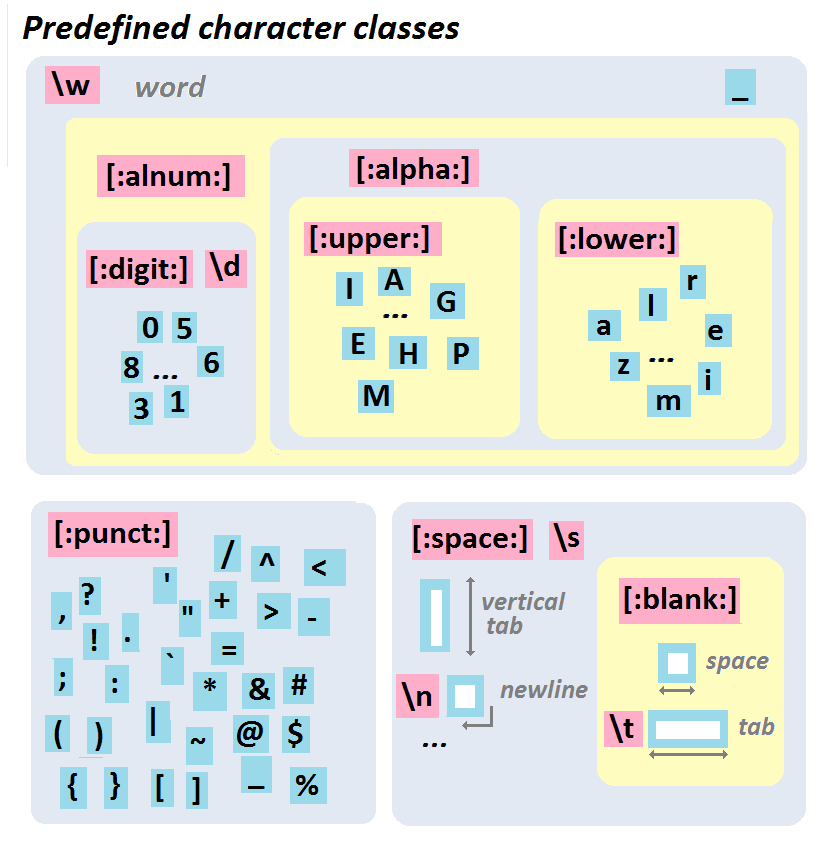 ::: {.aside}
From http://perso.ens-lyon.fr/lise.vaudor/strings-et-expressions-regulieres/
:::
## Example
How would we write a regular expression to match a telephone number with the form `(###) ###-####`?
```{r}
text = c("apple" , "(219) 733-8965" , "(329) 293-8753")
```
. . .
```r
str_detect(text, "(\d\d\d) \d\d\d-\d\d\d\d")
```
```
## Error: '\d' is an unrecognized escape in character string starting ""(\d"
```
. . .
```{r}
str_detect(text, "(\\d\\d\\d) \\d\\d\\d-\\d\\d\\d\\d")
```
. . .
```{r}
str_detect(text, "\\(\\d\\d\\d\\) \\d\\d\\d-\\d\\d\\d\\d")
```
## Classes and Ranges
We can also specify our own classes using square brackets, to simplify these classes ranges can be used for contiguous characters or numbers.
| Class | Type |
|----------|:------------|
| `[abc]` | Class (a or b or c) |
| `[^abc]` | Negated class (not a or b or c) |
| `[a-c]` | Range lower case letter from a to c |
| `[A-C]` | Range upper case letter from A to C |
| `[0-7]` | Digit between 0 to 7 |
## Example
```{r}
text = c("apple" , "(219) 733-8965" , "(329) 293-8753")
```
. . .
```{r}
str_replace_all(text, "[aeiou]" , "*")
```
. . .
```{r}
str_replace_all(text, "[13579]" , "*")
```
. . .
```{r}
str_replace_all(text, "[1-5a-f]" , "*")
```
. . .
```{r}
str_replace_all(text, "[^1-5a-f]" , "*")
```
## Exercises 1
For the following vector of randomly generated names, write a regular expression that,
* detects if the person's first name starts with a vowel (a,e,i,o,u)
* detects if the person's last name starts with a vowel
* detects if either the person's first or last name start with a vowel
* detects if neither the person's first nor last name start with a vowel
::: {.small}
```{r echo=FALSE, comment=""}
library(randomNames)
set.seed(124)
dput(randomNames(20, name.order="first.last" , name.sep=" "))
```
:::
```{r}
#| echo: false
countdown::countdown(5)
```
## Quantifiers
Attached to literals or character classes these allow a match to repeat some number of time.
| Quantifier | Description |
|:-----------|:------------|
| `*` | Match 0 or more |
| `+` | Match 1 or more |
| `?` | Match 0 or 1 |
| `{3}` | Match Exactly 3 |
| `{3,}` | Match 3 or more |
| `{3,5}` | Match 3, 4 or 5 |
## Example
How would we improve our previous regular expression for matching a telephone number with the form `(###) ###-####`?
```{r}
text = c("apple" , "(219) 733-8965" , "(329) 293-8753")
```
. . .
```{r}
str_detect(text, "\\(\\d\\d\\d\\) \\d\\d\\d-\\d\\d\\d\\d")
```
. . .
```{r}
str_detect(text, "\\(\\d{3}\\) \\d{3}-\\d{4}")
```
. . .
```{r}
str_extract(text, "\\(\\d{3}\\) \\d{3}-\\d{4}")
```
## Greedy vs non-greedy matching
What went wrong here?
```{r}
text = ""
```
```{r}
str_extract(text, "
::: {.aside}
From http://perso.ens-lyon.fr/lise.vaudor/strings-et-expressions-regulieres/
:::
## Example
How would we write a regular expression to match a telephone number with the form `(###) ###-####`?
```{r}
text = c("apple" , "(219) 733-8965" , "(329) 293-8753")
```
. . .
```r
str_detect(text, "(\d\d\d) \d\d\d-\d\d\d\d")
```
```
## Error: '\d' is an unrecognized escape in character string starting ""(\d"
```
. . .
```{r}
str_detect(text, "(\\d\\d\\d) \\d\\d\\d-\\d\\d\\d\\d")
```
. . .
```{r}
str_detect(text, "\\(\\d\\d\\d\\) \\d\\d\\d-\\d\\d\\d\\d")
```
## Classes and Ranges
We can also specify our own classes using square brackets, to simplify these classes ranges can be used for contiguous characters or numbers.
| Class | Type |
|----------|:------------|
| `[abc]` | Class (a or b or c) |
| `[^abc]` | Negated class (not a or b or c) |
| `[a-c]` | Range lower case letter from a to c |
| `[A-C]` | Range upper case letter from A to C |
| `[0-7]` | Digit between 0 to 7 |
## Example
```{r}
text = c("apple" , "(219) 733-8965" , "(329) 293-8753")
```
. . .
```{r}
str_replace_all(text, "[aeiou]" , "*")
```
. . .
```{r}
str_replace_all(text, "[13579]" , "*")
```
. . .
```{r}
str_replace_all(text, "[1-5a-f]" , "*")
```
. . .
```{r}
str_replace_all(text, "[^1-5a-f]" , "*")
```
## Exercises 1
For the following vector of randomly generated names, write a regular expression that,
* detects if the person's first name starts with a vowel (a,e,i,o,u)
* detects if the person's last name starts with a vowel
* detects if either the person's first or last name start with a vowel
* detects if neither the person's first nor last name start with a vowel
::: {.small}
```{r echo=FALSE, comment=""}
library(randomNames)
set.seed(124)
dput(randomNames(20, name.order="first.last" , name.sep=" "))
```
:::
```{r}
#| echo: false
countdown::countdown(5)
```
## Quantifiers
Attached to literals or character classes these allow a match to repeat some number of time.
| Quantifier | Description |
|:-----------|:------------|
| `*` | Match 0 or more |
| `+` | Match 1 or more |
| `?` | Match 0 or 1 |
| `{3}` | Match Exactly 3 |
| `{3,}` | Match 3 or more |
| `{3,5}` | Match 3, 4 or 5 |
## Example
How would we improve our previous regular expression for matching a telephone number with the form `(###) ###-####`?
```{r}
text = c("apple" , "(219) 733-8965" , "(329) 293-8753")
```
. . .
```{r}
str_detect(text, "\\(\\d\\d\\d\\) \\d\\d\\d-\\d\\d\\d\\d")
```
. . .
```{r}
str_detect(text, "\\(\\d{3}\\) \\d{3}-\\d{4}")
```
. . .
```{r}
str_extract(text, "\\(\\d{3}\\) \\d{3}-\\d{4}")
```
## Greedy vs non-greedy matching
What went wrong here?
```{r}
text = ""
```
```{r}
str_extract(text, ".*
")
```
. . .
If you add `?` after a quantifier, the matching will be *non-greedy* (find the shortest possible match, not the longest).
```{r}
str_extract(text, ".*?
")
```
## Groups
Groups allow you to connect pieces of a regular expression for modification or capture.
| Group | Description |
|-----------------|:-----------------------------------------|
| (a | b) | match literal "a" or "b" , group either |
| a(bc)? | match "a" or "abc" , group bc or nothing |
| (abc)def(hig) | match "abcdefhig" , group abc and hig |
| (?:abc) | match "abc" , non-capturing group |
## Example
::: {.small}
```{r}
text = c("Bob Smith" , "Alice Smith" , "Apple")
```
:::
. . .
:::: {.columns .small}
::: {.column width='50%'}
```{r}
str_extract(text, "^[:alpha:]+")
```
:::
::: {.column width='50%'}
```{r}
str_match(text, "^[:alpha:]+")
```
:::
::::
. . .
:::: {.columns .small}
::: {.column width='50%'}
```{r}
str_extract(text, "^([:alpha:]+) [:alpha:]+")
```
:::
::: {.column width='50%'}
```{r}
str_match(text, "^([:alpha:]+) [:alpha:]+")
```
:::
::::
. . .
:::: {.columns .small}
::: {.column width='50%'}
```{r}
str_extract(text, "^([:alpha:]+) ([:alpha:]+)")
```
:::
::: {.column width='50%'}
```{r}
str_match(text, "^([:alpha:]+) ([:alpha:]+)")
```
:::
::::
## How not to use a RegEx
Validating an email address:
```
(?:[a-z0-9!#$%&'*+/=?^_`{|}~-]+(?:\.[a-z0-9!#$%&'*+/=?^_`{|}~-]+)*|"
(?:[\x01-\x08\x0b\x0c\x0e-\x1f\x21\x23-\x5b\x5d-\x7f]|\\[\x01-\x09\x0b\x0c\x0e-\x7f])*")
@(?:(?:[a-z0-9](?:[a-z0-9-]*[a-z0-9])?\.)+[a-z0-9](?:[a-z0-9-]*[a-z0-9])?|\\[
(?:(?:25[0-5]|2[0-4][0-9]|[01]?[0-9][0-9]?)\.){3}
(?:25[0-5]|2[0-4][0-9]|[01]?[0-9][0-9]?|[a-z0-9-]*[a-z0-9]:
(?:[\x01-\x08\x0b\x0c\x0e-\x1f\x21-\x5a\x53-\x7f]|\\[\x01-\x09\x0b\x0c\x0e-\x7f])+)\])
```
::: {.aside}
Behold the horror of an old school perl regex for email addresses [here](http://www.ex-parrot.com/~pdw/Mail-RFC822-Address.html)
:::
## Exercise 2
```{r}
text = c(
"apple" ,
"219 733 8965" ,
"329-293-8753" ,
"Work: (579) 499-7527; Home: (543) 355 3679"
)
```
* Write a regular expression that will extract *all* phone numbers contained in the vector above.
* Once that works use groups to extracts the area code separately from the rest of the phone number.
```{r}
#| echo: false
countdown::countdown(5)
```